
Your phone rings minutes before the bank closes.
The caller sounds exactly like your chief executive. You recognize the voice, confidence and familiar way of speaking. The CEO says the company is completing a confidential acquisition and needs you to authorize an urgent transfer.
A video meeting follows. The chief financial officer appears on screen alongside other colleagues. They confirm the transaction and warn that any delay could destroy the deal.
Would you send the money?
In a widely reported corporate fraud case, an employee attended a video conference containing what appeared to be several colleagues, including a senior financial executive. After the meeting, the employee authorized approximately $25 million in transfers. Investigators later determined that the other participants had been digitally fabricated.
The victim did not fall for a badly written message from an obvious stranger. He was deceived by an artificial meeting designed to make a fraudulent request feel fully verified.
CEO deepfake scams exploit the trust employees place in recognizable faces, familiar voices and senior authority. Criminals can now imitate executives during telephone and video calls while supporting the impersonation with compromised email accounts, fake lawyers, forged invoices and accurate company information.
The solution is not becoming better at staring at pixels. It is creating a verification procedure that no face, voice or job title can bypass.
Maybe you are wondering,
What to Do If Your CEO Sends a Voice Message Requesting an Urgent Payment
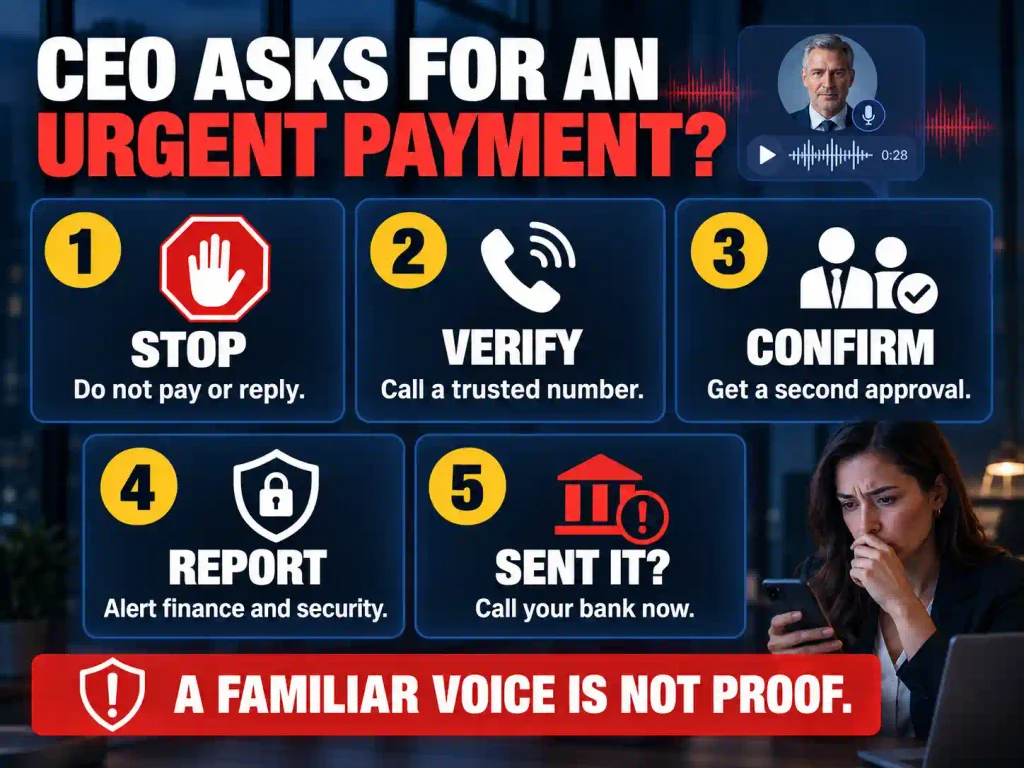
If your CEO sends an unexpected voice message asking for an urgent payment, do not transfer the money immediately—even if the voice sounds completely genuine. Pause the request, verify it through a separate communication channel and follow your company’s normal payment-approval process. A familiar voice is no longer reliable proof of identity because scammers can use AI voice cloning to imitate an executive’s accent, tone and speaking style.
The more urgent, secretive or unusual the request appears, the more carefully you should verify it.
1. Stop and Do Not Make the Payment
Your first action should be to pause. Do not open banking software, create a new beneficiary or start preparing the transfer while you investigate.
Scammers manufacture urgency because they do not want you to think clearly. The voice message may claim that:
- A confidential acquisition must be completed immediately.
- A supplier will cancel an important contract.
- The CEO is traveling and cannot speak normally.
- Legal action will follow if the invoice is not paid.
- The payment must remain secret from other employees.
- Normal approval procedures should be ignored.
A real deadline does not cancel basic financial controls. If the request is legitimate, the executive should accept a short delay while you confirm it.
2. Do Not Verify the Request Through the Same Message
Do not reply to the voice memo and ask, “Is this really you?” You may still be communicating with the scammer.
Instead, contact the CEO through an independently verified channel. Call a phone number already stored in your company directory, speak to the executive in person or contact their assistant using established company details.
Do not use a phone number, email address or link included with the suspicious request. Those details may lead directly back to the criminal.
3. Ask for Specific Confirmation
When you reach the CEO, do not ask only a vague question such as, “Did you request a payment?” Provide the exact details:
- The amount requested
- The recipient’s name
- The destination bank
- The account number
- The payment deadline
- The reason given for the transfer
- Any instruction to keep the transaction confidential
If your company uses a private verification phrase or security code, ask for it. However, never put that code inside an email, chat or voice message that criminals could later access.
4. Follow the Normal Approval Process
Never allow a convincing voice to replace your company’s financial controls. The payment should still require the usual documentation, authorization and review.
Confirm that:
- The invoice exists and matches the amount requested.
- The supplier or recipient is already approved.
- The bank-account information has not recently changed.
- The payment has the required second authorization.
- The request follows the company’s purchasing policy.
- Another authorized employee has independently reviewed it.
A demand to skip these checks is a major warning sign. Seniority does not make an unverified payment request safe.
5. Examine the Request for Signs of CEO Voice Fraud
An AI-generated voice can sound convincing, so do not depend on strange pronunciation or robotic audio alone. Focus on the circumstances surrounding the message.
Treat the request as suspicious when it involves:
- An unusual payment amount
- A new or recently changed bank account
- A wire transfer, cryptocurrency payment or gift cards
- Pressure to act within minutes
- Instructions to bypass another employee
- A demand for secrecy
- Contact from an unfamiliar number
- A payment outside normal business hours
- Claims that the CEO cannot take a return call
- Language or behavior that does not match the executive’s usual process
One warning sign may have an innocent explanation. Several warning signs together should stop the transaction completely.
6. Preserve the Voice Message and Report It
Do not delete the voice memo, chat, email or caller information. Save the original message, take screenshots and record when it arrived. Preserve any payment instructions, account details and related communication.
Report the incident immediately to the appropriate people inside the organization, such as:
- The finance manager
- The information-security team
- The fraud or compliance department
- The CEO or executive being impersonated
- The company’s bank, if account information was entered or money was sent
The organization should also check whether the scammer compromised an employee account, copied information from previous invoices or studied the CEO’s public recordings before creating the fake voice.
What If You Already Sent the Payment?
Contact your bank or payment provider immediately and ask it to stop, recall or freeze the transfer. Do not wait until the next business day. Speed matters because criminals often move stolen funds through several accounts shortly after receiving them.
Then preserve every piece of evidence, notify the appropriate people within the company and report the fraud to the relevant law-enforcement or cybercrime authority. If login credentials or banking information may have been exposed, change the affected passwords and secure the accounts immediately.
The safest rule is simple: a recognizable voice can support a payment request, but it should never authorize one. Every urgent request from a CEO, CFO or other executive must be independently verified before money leaves the company.
And,
What Are CEO Deepfake Scams?
CEO deepfake scams are executive-impersonation attacks involving artificially generated or manipulated voices, faces, videos or images.
The criminal may pretend to be:
- A chief executive officer
- A chief financial officer
- A founder
- A board member
- A managing director
- A regional leader
- An investor
- A company lawyer
- A major client
- A trusted vendor
The objective may be to persuade an employee or business partner to:
- Transfer money
- Change supplier banking information
- Purchase gift cards
- Send cryptocurrency
- Release confidential documents
- Reset a password
- Disable a security control
- Change payroll information
- Reveal login credentials
- Install software
- Approve an unusual contract
- Conceal an unauthorized transaction
Deepfake CEO fraud rarely depends on artificial media alone. A sophisticated operation may combine voice cloning, video manipulation, phishing, account takeover, forged documents and information gathered from the company.
This makes it a specialized form of deepfake scams with potentially devastating consequences for businesses.
Three Types of Executive Impersonation Attacks
Not every message from a fake executive is technically a deepfake. Companies need to understand what may have been compromised before responding.
Executive Spoofing
The criminal creates an email address, telephone number or profile that resembles the executive’s genuine account.
Examples include:
- A lookalike company domain
- A manipulated caller ID
- A copied profile photograph
- A fake messaging account
- A misleading email display name
The genuine account remains secure, but the imitation appears credible.
Executive Account Takeover
The criminal gains access to the executive’s real email, messaging or collaboration account.
Messages may arrive from a legitimate address and appear inside an existing conversation. This makes the attack more difficult to recognize.
The organization must secure the account, review unauthorized activity and determine what information the attacker accessed.
Executive Deepfake
The criminal artificially imitates the executive’s voice, face or movements.
A deepfake may appear as:
- A voice note
- A telephone call
- A video message
- A live video meeting
- A manipulated company announcement
- A fake social-media video
These attack types can be combined. A criminal might enter a genuine executive account, send a fraudulent payment request and then use a cloned voice to confirm it.
Therefore, a message cannot be trusted solely because it comes from the correct account.
How Criminals Prepare a CEO Deepfake Attack
Executive impersonation is often carefully researched. The criminal wants the request to resemble a real business transaction rather than a random demand for money.
They Collect the Executive’s Voice and Appearance
Senior leaders often have public recordings from:
- Interviews
- Earnings calls
- Webinars
- Podcasts
- Conference speeches
- Investor presentations
- Company videos
- Social-media posts
- Online training
- Public meetings
These recordings may provide enough material to imitate the executive’s voice, face, vocabulary and speaking habits.
They Study the Organization
Public and stolen information may reveal:
- Who processes payments
- Who can approve transactions
- Which suppliers the business uses
- Which executive is traveling
- What communication platforms employees use
- Whether a major transaction is underway
- Who recently joined the finance department
- Who reports directly to the CEO
- What projects are confidential
- When key decision-makers are unavailable
The attacker may also monitor a compromised mailbox for weeks before acting. This reveals genuine invoices, approval language, email signatures and relationships.
They Select an Employee With Useful Access
The executive’s identity is the disguise, but the targeted employee is the person who can produce the result.
Likely targets include:
- Finance managers
- Accounts-payable employees
- Payroll administrators
- Executive assistants
- IT support workers
- Human resources personnel
- Regional managers
- New employees
- Vendor-account administrators
Criminals often target employees who can act but may feel uncomfortable questioning senior leadership.
They Create a Believable Business Story
The fraudulent request may involve:
- A confidential acquisition
- An urgent vendor settlement
- A legal matter
- A board-approved investment
- A tax obligation
- A new international supplier
- A customer refund
- An emergency payroll issue
- An account-security problem
The story explains why the request is unusual, urgent and secret.
They Support the Lie Across Several Channels
An email may begin the conversation. A cloned voice call then provides reassurance. A video meeting appears to offer final confirmation.
A fake lawyer, consultant or finance executive may join the conversation to create additional authority.
These channels are not independent confirmation when the criminal controls all of them.
How a CEO Deepfake Scam Unfolds
Most attacks move through several psychological and operational stages.
The Availability Test
The employee receives a short message:
“Are you available to handle something confidential?”
This does not mention money. It tests whether the target is responsive and willing to engage privately.
The Confidential Story
The supposed executive describes a sensitive transaction and explains why normal colleagues cannot be involved.
Secrecy isolates the employee from anyone who might question the request.
The Urgent Deadline
The employee is told that the transaction must be completed before a bank closes, contract expires or meeting begins.
Urgency makes verification feel dangerous.
The Artificial Confirmation
If the employee hesitates, a voice or video call follows. The familiar executive appears to confirm everything.
The deepfake does not initiate the manipulation. It destroys the victim’s remaining doubt.
The Procedural Exception
The supposed executive acknowledges that the request is unusual but promises to complete the normal documents later.
The employee is asked to make “one exception.”
The Transfer
The victim sends money to a new account, divides the payment among several accounts or changes a supplier’s banking information.
If the first request succeeds, additional transactions may follow.
17 Red Flags of a CEO Deepfake Scam
Not every warning sign has the same value. A minor video defect is only a supporting clue. An instruction to bypass payment controls is a critical danger.
Evaluate the request itself before evaluating the person’s appearance.
1. The Executive Demands Secrecy
Risk level: Critical
The supposed CEO says the matter cannot be discussed because it concerns an acquisition, lawsuit, board decision or confidential investment.
Some business matters require discretion. However, confidentiality should limit unnecessary disclosure—not remove authorized review.
A legitimate confidential transaction can still follow secure financial procedures.
2. You Are Told to Bypass Company Policy
Risk level: Critical
Watch for statements such as:
- “We will complete the paperwork afterward.”
- “Do not wait for the second approver.”
- “I accept full responsibility.”
- “Keep this outside the accounting system.”
- “Use your personal account temporarily.”
- “The normal procedure does not apply.”
- “Send smaller payments to avoid delays.”
No executive should be able to remove every financial safeguard through a telephone or video call.
3. The Recipient’s Bank Information Has Changed
Risk level: Critical
The supposed executive may say that a supplier has changed banks because of an audit, technical problem or restructuring.
Never confirm the change using the telephone number on the new invoice. It may lead directly to the criminal.
Contact a known representative using details already stored in your company’s records.
4. Independent Verification Is Discouraged
Risk level: Critical
The caller becomes defensive when you propose contacting the executive through an established channel.
They may claim:
- The CEO is unavailable elsewhere.
- Nobody else knows about the transaction.
- Verification would delay the deal.
- Another call is unnecessary.
- Your hesitation shows a lack of trust.
A request that cannot survive independent verification should not be completed.
5. The Request Is Unusually Urgent
Risk level: Critical
The deadline may involve a closing bank, departing flight, legal filing or expiring contract.
A genuine deadline can exist. The danger is using that deadline to prevent reasonable authentication.
Financial controls are most important when the pressure is greatest.
6. The Request Arrives Through an Unexpected Channel
Risk level: High
A CEO who normally communicates through company systems suddenly uses:
- A personal email address
- A new telephone number
- A private messaging application
- An unfamiliar video platform
- A social-media account
Travel and technical problems may provide believable explanations. Verify through a previously trusted channel.
7. The Payment Must Be Split
Risk level: High
The supposed executive requests several smaller transfers instead of one transaction.
This may be designed to:
- Avoid approval thresholds
- Reduce bank scrutiny
- Reach several criminal accounts
- Prevent one failed transfer from stopping the theft
- Make the payments resemble ordinary activity
Do not divide a transaction to avoid company controls.
8. Gift Cards or Cryptocurrency Are Requested
Risk level: High
The CEO may claim that gift cards are needed for employee rewards, customers or an event. You may be asked to purchase them personally and send photographs of the codes.
Cryptocurrency may be described as necessary for an international supplier or confidential investment.
These payment methods are difficult to reverse and should trigger immediate escalation.
9. The Executive Is Publicly Traveling
Risk level: High
Criminals monitor conference announcements, social posts and automatic replies to learn when an executive is away.
Travel provides an excuse for:
- A different telephone number
- Poor video quality
- Unusual working hours
- New communication platforms
- Inability to meet in person
- Difficulty reaching the executive normally
An executive’s absence should increase verification requirements.
10. A Supposed Lawyer or Consultant Applies Pressure
Risk level: High
Another person may enter the conversation and claim to represent a law firm, investment adviser or acquisition partner.
The second participant creates social proof, but they may be another criminal or synthetic identity.
Verify the professional and organization independently.
11. The Voice Sounds Familiar but Not Completely Natural
Risk level: Supporting clue
Possible signs include:
- Flat emotional delivery
- Unusual rhythm
- Strange pauses
- Inconsistent accent
- Incorrect pronunciation of familiar names
- Missing background sounds
- Abrupt changes in volume
- Repeated phrases
- Difficulty speaking naturally during interruptions
A sophisticated cloned voice may have none of these weaknesses. A familiar voice is not authentication.
12. The Face Behaves Unnaturally
Risk level: Supporting clue
Possible deepfake-video clues include:
- Lip movement that does not match the words
- Flickering around the face
- Distorted glasses or earrings
- Teeth that change shape
- Unnatural blinking
- Shifting skin texture
- Inconsistent shadows
- Expressions that lag behind the voice
- Features changing when the head moves
Poor cameras and internet connections can cause similar defects. Do not accuse someone based on visual quality alone.
13. The Video Appearance Is Brief or Carefully Restricted
Risk level: Supporting clue
The supposed CEO may remain far from the camera, sit in poor lighting or disable video shortly after joining.
They may refuse to move, speak for only a few seconds or claim that the connection cannot support video.
A short appearance can create trust without giving the employee enough time to notice inconsistencies.
14. The Executive Cannot Answer an Unscripted Question
Risk level: High
Ask a relevant question about the transaction, supplier or internal approval process.
A criminal may:
- Ignore the question
- Repeat the original instruction
- Blame the connection
- End the call
- Switch to text
- Refer you to an accomplice
- Say there is no time to explain
Do not rely solely on personal questions. Criminals may have researched the executive or accessed company communications.
15. The Writing Style Has Changed
Risk level: Supporting clue
Look for unusual:
- Greetings
- Punctuation
- Vocabulary
- Sign-offs
- Spelling conventions
- Levels of formality
- Names used for colleagues
Artificial intelligence can imitate writing styles, and genuine people sometimes write differently under pressure. Treat changes as reasons to verify.
16. The Email Address Is Almost Correct
Risk level: High
Inspect the complete sender address.
Watch for:
- Missing letters
- Repeated characters
- Added words
- Different domain endings
- Substituted numbers or letters
- A display name hiding the actual sender
Even a correct address is not final proof. The executive’s genuine account may have been compromised.
17. The Executive Uses Anger or Authority to Stop Questions
Risk level: Critical
The impersonator may say:
- “Do you not recognize my voice?”
- “Why are you delaying this?”
- “I trusted you with this.”
- “Are you refusing my instruction?”
- “You are putting the deal at risk.”
- “We will discuss your behavior later.”
This weaponizes the employee’s fear of upsetting senior leadership.
A secure company rewards verification. It does not punish employees for applying required controls.
Also,
Use the S.A.F.E. Executive Verification Test
The S.A.F.E. test gives employees a procedure they can remember during a pressured call.
It does not depend on detecting strange pixels or robotic speech.
S — Stop the Request
Pause the payment, information release, account reset or banking change.
Do not stay on the line while investigating. The caller can continue applying psychological pressure or listening to your internal conversations.
A — Authenticate Through a Separate Channel
Contact the executive through a method that existed before the request.
Use:
- A trusted number in the company directory
- An established internal account
- An in-person conversation
- A verified executive assistant
- A company approval system
Never authenticate a suspicious person through information they provided.
F — Follow Every Required Procedure
Obtain all approvals, documents and recipient checks normally required.
If the transaction needs two approvers, the CEO cannot reduce it to one through a video call.
E — Examine Every Change
Look for unexpected changes involving:
- Recipient
- Bank account
- Payment amount
- Currency
- Country
- Deadline
- Communication channel
- Supporting documents
- Approvers
- Confidentiality
- Method of payment
The dangerous instruction may be hidden inside an otherwise accurate request.
For calls involving questionable faces, multiple synthetic participants or unexplained technical problems, apply the verification steps in deepfake video call scams before taking action.
The Exact Payment-Verification Workflow Businesses Need
Advice such as “be careful” is useless without a process.
Every organization should adapt the following workflow to its size, risk and legal obligations.
Step 1: Receive and Record the Request
Record:
- Who supposedly made the request
- When it arrived
- The requested amount or action
- The recipient
- The deadline
- The communication channel
- Any unusual instructions
Step 2: Pause Unusual Transactions
Do not process a new recipient, changed bank account or urgent exception automatically.
The pause should be mandatory rather than dependent on one employee’s confidence.
Step 3: Check the Request Against Existing Records
Compare the payment with:
- Approved contracts
- Purchase orders
- Previous invoices
- Known supplier information
- Established payment schedules
- Existing authorization limits
Step 4: Verify the Executive Independently
Contact the executive through a trusted channel.
Do not forward the suspicious message and ask, “Is this you?” if the same account may be compromised. Begin a separate communication through another verified method.
Step 5: Verify the Recipient
Use contact information from existing company records—not the new invoice.
Confirm the account name, bank details, reason for the change and effective date.
Step 6: Obtain a Second Approval
A second authorized person should review the evidence independently.
They should not merely sign because the first employee says the CEO approved it.
Step 7: Document the Verification
Record:
- Who was contacted
- Which channel was used
- What was confirmed
- Who approved the transaction
- When approval occurred
Documentation discourages procedural shortcuts and supports later investigation.
Step 8: Release and Monitor the Payment
After approval, monitor the transaction and confirm receipt through a trusted supplier contact when appropriate.
Escalate unexplained follow-up requests immediately.
What Employees Can Say Without Accusing the CEO
Employees sometimes recognize a suspicious request but fear appearing disrespectful.
Use neutral, procedural language:
“I understand that this is urgent. Our security procedure requires me to confirm unusual payment instructions through an established channel. I will begin that verification now.”
For changed banking information:
“Because the recipient’s bank details have changed, this transaction requires independent supplier confirmation and a second approval.”
For a password or access request:
“Our security policy does not allow me to change executive access from a call alone. I will complete the approved identity-verification process.”
A genuine executive should support these safeguards.
Verification Methods That Can Still Fail
Some checks feel reassuring but do not provide strong confirmation.
Recognizing the Executive’s Voice
Voice cloning is designed to imitate familiarity.
Seeing the Executive Live
A video feed can be altered, prerecorded or routed through a virtual camera.
Replying to the Same Email
If the account is compromised, replying keeps you inside the attacker’s environment.
Calling the Number in the Message
The number may belong to the criminal.
Asking One Secret Question
The answer may be available through public information, stolen messages or an accomplice.
Trusting Another Meeting Participant
Several people can be impersonated during the same operation.
Depending Entirely on Detection Software
Detection tools can support an investigation, but they should not decide whether a payment is released.
A telephone-only version of the attack may also belong to the broader category of AI voice scams, particularly when a cloned executive voice is used to approve a transfer or reset an account.
How Payroll Deepfake Scams Work
Executive impersonation does not always involve a multimillion-dollar transfer.
A criminal may impersonate an executive or employee and ask payroll to change direct-deposit information.
The message may say:
“I recently changed banks. Please update my salary account before the next payroll run.”
If payroll asks for confirmation, a cloned voice note or telephone call may follow.
Businesses should require:
- Requests through authenticated systems
- Independent confirmation
- Additional approval for payment changes
- Notification to the old contact method
- A waiting period where appropriate
- Documentation of the change
Email alone should not be sufficient to redirect an employee’s salary.
How IT Teams Are Targeted
A fake executive may contact technical support instead of finance.
The request could involve:
- Resetting a password
- Disabling multifactor authentication
- Adding a new device
- Creating an administrator account
- Revealing a security code
- Installing remote-access software
- Removing a security restriction
- Granting access to confidential files
The caller may claim to be traveling, locked out or preparing for an urgent board meeting.
IT teams must follow identity-verification procedures regardless of seniority. A familiar voice is not a replacement for authentication.
How Executives Can Reduce Their Impersonation Risk
Employees cannot carry the entire burden. Executives must create a culture and process that support verification.
Publicly Support Employee Verification
Tell employees directly:
“You will never be punished for pausing an unusual request and verifying it through the correct process.”
This removes one of the attacker’s strongest weapons.
Never Request Financial Exceptions Informally
Executives should not normalize sending urgent payment requests through personal messages.
Every genuine exception teaches employees that a future fraudulent exception might also be legitimate.
Protect Communication Accounts
Executives should use:
- Unique passwords
- Multifactor authentication
- Login alerts
- Device monitoring
- Controlled account-recovery methods
- Regular session reviews
Suspicious forwarding rules and connected applications should be investigated.
Limit Unnecessary Public Information
Where practical, avoid publishing detailed:
- Travel schedules
- Internal approval structures
- Employee contact information
- Sensitive transaction details
- Security procedures
- Reporting relationships
Companies cannot remove every executive recording, but they can reduce the additional information that makes impersonation more effective.
Establish an Emergency Verification Route
Employees should know exactly whom to contact when the executive cannot be reached.
Without an approved alternative, urgency may pressure workers into making their own dangerous decisions.
Practice the Response
Test whether employees follow the procedure:
- Did they stop the request?
- Did they leave the original channel?
- Did they use trusted contact information?
- Did they require the correct approvals?
- Did they report the attempt?
The objective is not to test whether workers can recognize an artificial face. It is to confirm that the organization remains secure when the face looks real.
What to Do After Sending Money
Act immediately. Do not wait for an internal investigation to finish.
Contact the Financial Institution
Ask the bank to:
- Stop pending payments
- Recall completed transfers
- Contact receiving and intermediary banks
- Freeze the recipient account where possible
- Preserve transaction records
- Escalate the case to its fraud department
Recovery is not guaranteed, but rapid reporting can improve the possibility.
Alert the Correct Internal Teams
Notify:
- Finance leadership
- Information security
- Legal counsel
- Compliance
- The impersonated executive
- Senior management
- The organization’s insurer when required
Use independently verified channels.
Preserve the Evidence
Save:
- Emails with complete headers
- Chat histories
- Voice notes
- Telephone numbers
- Meeting invitations
- Participant lists
- Video recordings
- Invoices
- Bank details
- Payment confirmations
- Account-login records
- Approval histories
- Screenshots
Do not alter original files.
Secure Potentially Compromised Accounts
Change affected passwords, end unknown sessions and review:
- Mailbox forwarding rules
- Recovery information
- Connected applications
- New devices
- Unauthorized delegates
- Messages sent without the user’s knowledge
Determine whether the criminal copied the executive or controlled a genuine account.
Report the Fraud
Report the incident to the appropriate law-enforcement and cybercrime authorities.
In the United States, online financial fraud and business email compromise can be reported through IC3.gov. Organizations should also satisfy applicable legal, insurance, contractual and regulatory notification requirements.
Frequently Asked Questions About CEO Deepfake Scams
The following answers address practical questions businesses and employees may have about executive impersonation and deepfake CEO fraud.
What is a CEO deepfake scam?
It is an attack in which criminals use manipulated or artificially generated audio, video or images to impersonate a senior executive and influence another person.
What is deepfake CEO fraud?
Deepfake CEO fraud is another name for executive impersonation involving synthetic media, often used to authorize payments, account changes or information releases.
Is a CEO deepfake scam the same as business email compromise?
No. Business email compromise centers on deceptive or compromised email. A CEO deepfake scam uses synthetic voice, video or imagery, although both methods can appear in one attack.
Can criminals clone a CEO’s voice from public videos?
Potentially. Interviews, speeches, podcasts and presentations may provide material that helps create a convincing imitation.
Can a cloned voice hold a live telephone conversation?
Some voice-manipulation tools can operate during live calls. Other attacks rely on voice notes, prerecorded phrases or generated responses.
Can scammers conduct a live deepfake video call?
Yes. Real-time face replacement, virtual cameras and other techniques can make an artificial or stolen identity appear during a live meeting.
Can every colleague in a video meeting be fake?
Potentially. A meeting can contain synthetic participants, prerecorded material or human accomplices supporting the same deception.
Can a fake call appear to come from the CEO’s real number?
Caller information can be manipulated in some circumstances. Never trust caller ID alone when the request involves money, credentials or confidential data.
Can a fraudulent request come from the CEO’s genuine email account?
Yes. A criminal may compromise the real account. Correct sender information does not eliminate the need to verify an unusual request.
How can I recognize a cloned executive voice?
Unnatural pacing, emotion, breathing or pronunciation may raise suspicion. Nevertheless, some imitations sound convincing, so independent authentication remains necessary.
Does strange video quality prove that the CEO is fake?
No. Ordinary network and camera problems can produce similar defects. Treat visual anomalies as supporting clues, not conclusive evidence.
What should I do if the CEO cannot be reached?
Wait or use the company’s approved alternative verification route. The executive’s unavailability should never automatically authorize an exception.
What typically happens in the first phase of a CEO fraud attack involving a video call?
The criminals usually prepare before the call. They gather recordings or images of the executive, learn how the company works, identify an employee who can approve a payment, and create a believable reason to contact that person. They may first send a message or meeting invitation. The video call then helps make the impersonation seem credible before an urgent request is made.
Can a CEO waive dual authorization?
A secure policy should prohibit any person from removing required financial controls through an informal message, voice call or video meeting.
Should companies accept payment instructions through messaging applications?
High-risk instructions should enter an authenticated approval process. A private message should not be sufficient to release money.
Why do CEO impersonators demand secrecy?
Secrecy isolates the target and prevents colleagues from challenging the request.
Why do they create urgency?
Urgency reduces the time available for verification and makes delay feel dangerous.
Why are new employees frequently targeted?
They may not know how executives normally communicate and may feel uncomfortable questioning senior leaders.
Are small businesses at risk?
Yes. Small businesses may have informal procedures and fewer approval layers, making a successful request easier to execute.
Can a secret company code word prevent the scam?
It can provide another barrier but should not be the only control. Code words can be leaked, guessed or discovered in compromised communications.
Is calling the executive back sufficient?
Only when you use a trusted number obtained before the suspicious request. Never use a number supplied in the message you are trying to verify.
What is out-of-band verification?
It means confirming the request through a separate, trusted communication channel.
Should businesses use deepfake-detection software?
Detection tools can support security teams, but they should complement payment and authentication procedures rather than replace them.
What should happen when supplier bank details change?
Contact a known supplier representative using existing records, verify the details independently and obtain the required internal approvals.
Can cyber insurance cover a deepfake payment loss?
Coverage depends on the policy, circumstances and compliance with required controls. Notify the insurer or broker promptly and obtain advice based on the actual policy.
How quickly should the bank be contacted after a fraudulent transfer?
Immediately. Do not wait for complete proof or a finished internal investigation before asking the bank to stop or recall the payment.
Final Warning
CEO deepfake scams succeed by attacking human obedience and weak business procedures.
The cloned voice creates familiarity. The synthetic face appears to provide proof. The executive title discourages questions. Urgency removes time, while secrecy removes help.
Do not build your defense around identifying unnatural blinking or distorted facial edges. Those signs may disappear as the technology improves.
Build a process the criminal cannot bypass.
Remember S.A.F.E.:
- Stop the request.
- Authenticate through a separate channel.
- Follow every required procedure.
- Examine every change.
A voice can be cloned. A video meeting can be fabricated. A genuine email account can be compromised.
A payment that requires independent verification, recipient confirmation and multiple approvals is considerably harder to steal.


Pingback: Deepfake Video Call Scams: 13 Red Flags and a 90-Second Verification Test - SafeGuard Press
Pingback: What Is CEO Fraud? 17 Warning Signs, Real Examples and Prevention Steps - SafeGuard Press