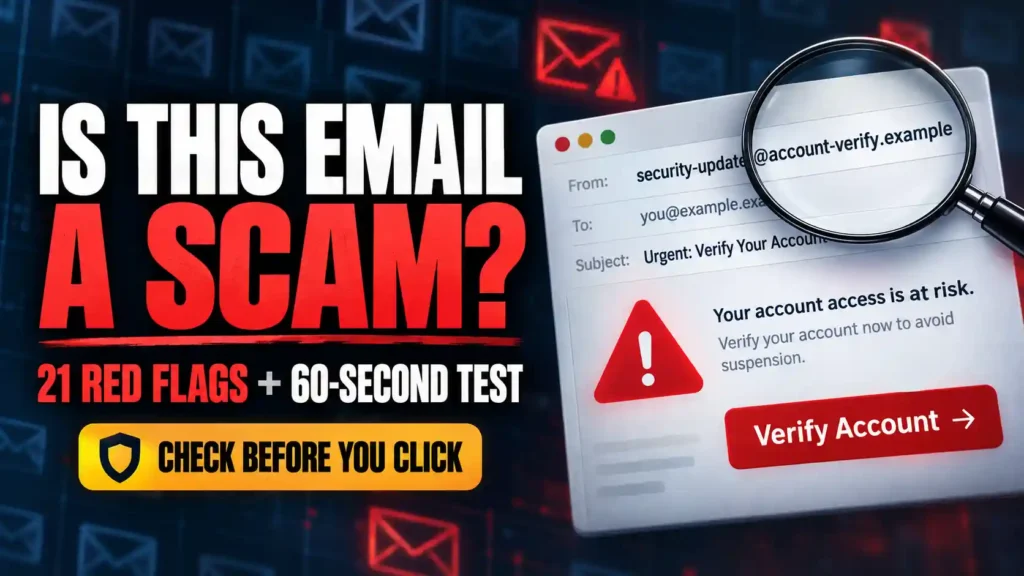
An email lands in your inbox with your bank’s logo and your full name.
“We detected an unauthorized payment. Verify your identity within 30 minutes to prevent your account from being suspended.”
The message looks professional. The spelling is perfect. The sender’s name appears correct. There is even a security notice at the bottom.
Should you click?
No—not until you verify the message outside the email.
Scam emails are harder to recognize than they once were. Criminals can copy genuine company messages, impersonate real employees and use artificial intelligence to produce polished writing. Some can even send messages from compromised accounts belonging to people you know.
Fortunately, a convincing appearance does not make an email impossible to test.
To tell if an email is from a scammer, reveal the complete sender address, inspect the actual domain, preview links without opening them and identify what the message wants you to do. Be especially suspicious of unexpected requests involving money, passwords, verification codes, attachments or immediate action. Verify the claim through the organization’s official app, website or a trusted telephone number obtained independently.
Do not use the questionable email to prove that the email is genuine.
This guide gives you 21 warning signs, a 60-second test, realistic scam email examples and the exact steps to take if you already clicked, replied, downloaded something or sent money.
Is This Email a Scam? Check These 5 Things First
An email can look convincing and still be a scam. Before you click, reply, download an attachment, or send money, check these five things:
- Check the full sender address. Open the sender details and read the address after the @ symbol. A familiar display name or logo does not prove who sent the email.
- Look at what the email asks you to do. Be suspicious if it asks for a password, verification code, card details, payment, or an unexpected download.
- Inspect links without opening them. On a computer, hover over a link to see its destination. On a phone, avoid tapping a suspicious link; use the company’s app or type its known website address yourself.
- Notice pressure and threats. A deadline such as “act within 30 minutes or lose access” is a reason to slow down and verify the claim.
- Contact the organization independently. Use a phone number, app, or website you already trust. Do not use the contact details supplied in the suspicious email.
If you cannot verify the message, leave its links and attachments unopened. You can report it as phishing and delete it.
How to Tell If an Email Is From a Scammer in 60 Seconds
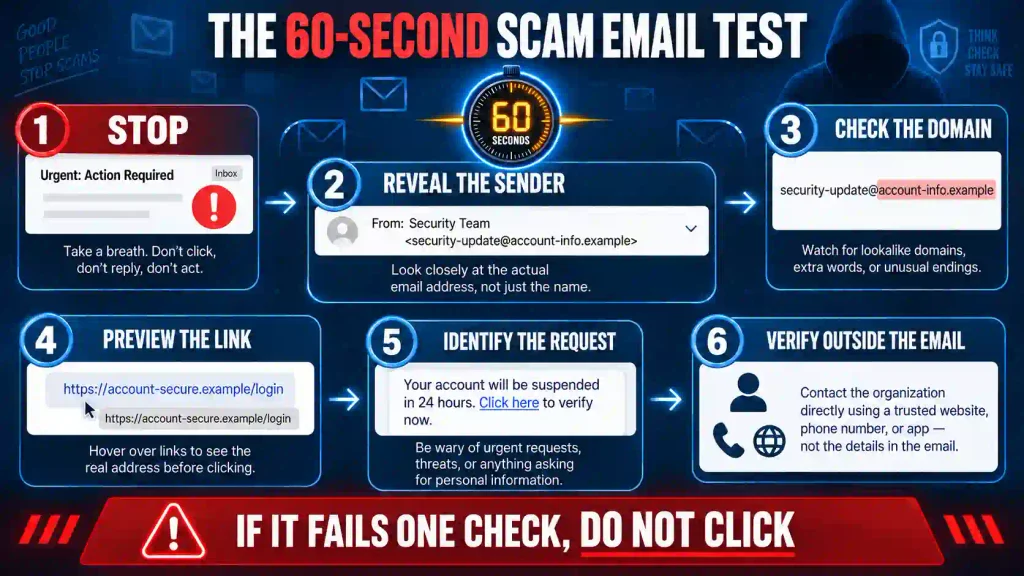
You do not need to be a cybersecurity expert. Before interacting with an unexpected message, perform these six checks.
1. Stop before taking the requested action
Do not immediately:
- Click a button
- Open an attachment
- Scan a QR code
- Reply to the sender
- Call a telephone number in the message
- Send money
- Provide personal information
Scam emails are designed to make you react before you investigate. Pausing breaks that pattern.
2. Reveal the complete sender address
The display name might say “PayPal,” “Microsoft Support,” “Your Bank” or the name of your manager. Anyone can enter a familiar-looking display name.
Click or tap the name to reveal the full email address.
A message displaying “Amazon Customer Service” might actually come from:
amazon.refund.department@gmail.com
That mismatch is a major warning sign.
However, a correct-looking sender address does not prove that the message is genuine. The account could be compromised, or the visible sender information could be manipulated.
3. Examine the domain carefully
The domain is the part after the “@” symbol in the sender’s address.
Compare it with the organization’s real domain. Watch for:
- Missing letters
- Added words
- Substituted numbers
- Extra hyphens
- Unfamiliar endings
- Look-alike characters
For example:
support@paypa1.com
is not the same as:
support@paypal.com
The number “1” has replaced the letter “l.”
4. Preview links without opening them
On a computer, hover your pointer over a button or link without clicking. The real destination should appear near the bottom of the window.
On a phone, pressing and holding a link may show a preview. Be careful not to open it accidentally.
Do not trust the words printed on the button. “Review Account,” “Cancel Payment” or “Track Package” can conceal a completely unrelated website.
5. Identify what the sender wants from you
Ask one blunt question:
“What will the sender gain if I follow these instructions?”
A scammer may want:
- Your login credentials
- Your payment information
- A verification code
- A gift card
- A wire transfer
- A copy of your identification
- Remote access to your device
- An infected file to be opened
The more sensitive the request, the more important independent verification becomes.
6. Verify the claim outside the email
Close the message.
Open the organization’s official application, type its known website into your browser or call a number from a statement, bank card, contract or other trusted record.
If the claimed problem does not appear inside your real account, the email is probably fraudulent.
The Most Important Rule for Checking a Suspicious Email
Never use contact information provided only inside a suspicious email to verify that same email.
Do not verify it by:
- Replying to the sender
- Calling the displayed number
- Clicking the supplied link
- Opening an attached “verification form”
- Contacting another person introduced by the sender
All those routes may lead back to the same criminal operation.
Instead, use a separate communication channel that existed before the email arrived.
Still wodering,
How to Spot a Phishing Email Before You Click
A convincing email can still be a trap. Before clicking, check these warning signs:
- Inspect the sender’s full email address. A familiar display name can hide an unrelated address or a misspelled domain.
- Check the link’s destination. On a computer, hover without clicking. On a phone, avoid opening unfamiliar links.
- Question urgent demands. Threats, unexpected invoices, delivery problems, and account warnings often pressure you into acting.
- Protect sensitive information. Never share passwords, verification codes, or banking details by email.
- Treat unexpected attachments cautiously, even when the sender looks familiar.
To verify the message, open the company’s official app or type its known website address yourself. Contact the sender through a trusted number. Good spelling and logos prove nothing.
21 Warning Signs an Email May Be From a Scammer
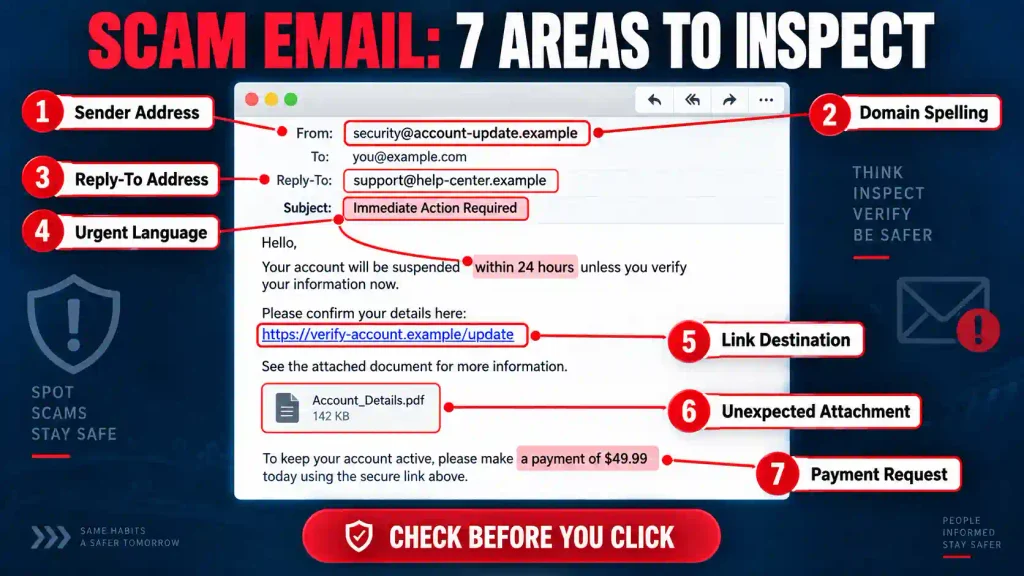
A single warning sign may have an innocent explanation. Several warning signs appearing together create a much stronger case that the message is fraudulent.
1. The sender’s address does not match the claimed organization
A bank, government agency or major company would not normally conduct sensitive business through an unrelated personal account.
Examples of suspicious addresses include:
bankfraudhelp@gmail.comgovernment.refund@yahoo.comnetflixpaymentteam@outlook.compaypalverification2026@gmail.com
Always judge the complete address—not the display name or profile picture.
2. The domain contains a subtle misspelling
Scammers register look-alike domains because they know people read quickly.
Examples include:
amaz0n.cominstead ofamazon.compaypa1.cominstead ofpaypal.comrnicrosoft.cominstead ofmicrosoft.comnetfllx.cominstead ofnetflix.comwellsfarg0.cominstead ofwellsfargo.com
Check every character before trusting the address.
3. The company name appears in the wrong part of the address
An address can contain a legitimate company name without belonging to that company.
Consider:
security@paypal.account-review.example.com
The important part is not “paypal.” The controlling domain is example.com.
Scammers place familiar words inside long addresses to distract you from the domain they actually control.
4. The “From” and “Reply-To” addresses are different
Some legitimate organizations use different systems for sending and receiving email, so a mismatch does not automatically prove fraud.
However, it becomes suspicious when a message from a bank, employer or government agency directs replies to an unrelated domain or free email account.
Reveal the detailed sender information and inspect both addresses.
5. You were not expecting the message
Before doing anything, ask:
- Do I have an account with this organization?
- Did I place this order?
- Did I request this password reset?
- Am I expecting this document?
- Did I apply for this job?
- Am I waiting for this package?
- Do I know the sender?
- Does this request match a recent conversation?
An unexpected message deserves more scrutiny, particularly when it demands action.
6. The email creates artificial urgency
Scammers often impose a short deadline because careful verification threatens the scheme.
Common examples include:
- Respond within 30 minutes.
- Your account will be closed today.
- This is your final warning.
- Immediate payment is required.
- Your package will be returned.
- Your refund expires tonight.
- Act now to prevent legal action.
Even when a real problem is urgent, you should still be able to verify it through the organization’s official channels.
Urgency is a signal to slow down.
7. The message threatens frightening consequences
Fear makes people act without thinking.
A fraudulent email might threaten:
- Arrest
- Deportation
- A frozen bank account
- Loss of government benefits
- Legal action
- Utility disconnection
- Public exposure
- An additional financial penalty
- Permanent deletion of an account
- Destruction of a package
Do not argue with the sender. Verify the claim independently.
8. The email promises unexpected money or rewards
Some scammers replace fear with excitement.
They may claim that you have received:
- A lottery prize
- An inheritance
- A government grant
- A tax refund
- A business opportunity
- An investment profit
- A compensation payment
- A free vacation
- A charitable donation
- A high-paying job
The catch usually appears later as a processing fee, tax, insurance payment or request for banking information.
You cannot win a legitimate lottery you never entered.
9. The greeting or personal details are wrong
A scam email may begin with:
- Dear Customer
- Dear User
- Dear Beneficiary
- Account Holder
- Dear Sir or Madam
- Valued Member
A generic greeting alone does not prove fraud. Automated newsletters sometimes use them.
Look for more revealing errors:
- Your name is misspelled.
- The account number is wrong.
- The email uses an old address.
- It mentions a service you do not use.
- The purchase currency does not match your country.
- It refers to a delivery you never ordered.
10. The email asks for a password, PIN or verification code
Never send a password, PIN or one-time security code in response to an unexpected email.
A scammer may say the code is required to:
- Cancel a payment
- Confirm your identity
- Protect your account
- Complete a refund
- Reverse a transaction
- Stop an unauthorized login
In reality, the criminal may be using the code to enter your account.
If you did not initiate the login or transaction, do not approve it.
11. The sender requests sensitive personal information
Be extremely cautious if an unexpected message asks for:
- A Social Security number
- Bank details
- Credit card information
- A passport
- A driver’s license
- Tax information
- A date of birth
- Security-question answers
- A home address
- Photographs of identification documents
Even if an organization genuinely needs this information, submit it through a verified secure system—not by replying to an unexpected email.
12. The sender demands an unusual payment method
Scammers prefer payments that are quick, transferable and difficult to reverse.
Major warning signs include requests for:
- Gift cards
- Cryptocurrency
- Wire transfers
- Prepaid cards
- Cash
- Gold
- Payment applications
- A check deposit followed by a partial refund
No legitimate bank or government agency will require gift cards to settle a debt, cancel an arrest warrant or restore an account.
13. The email mentions an order or charge you do not recognize
Fake invoices are designed to frighten you into clicking or calling.
The email may claim that you bought:
- A smartphone
- A computer
- Antivirus software
- Cryptocurrency
- Gift cards
- A streaming subscription
- Business software
- An extended warranty
The “Cancel Order” button or support number may be the real trap.
Open the company’s official app or website independently. If the purchase is not in your account, do not interact with the email.
14. The message contains an unexpected attachment
A dangerous attachment may be disguised as:
- An invoice
- A résumé
- A tax document
- A court notice
- A shipping label
- A bank statement
- A voice message
- A purchase order
- A shared document
- A payment confirmation
Exercise particular caution with compressed folders, executable files, macro-enabled documents and password-protected archives.
A PDF is not automatically safe. It can contain a link to a fake login page.
Confirm the file with the alleged sender through another communication channel before opening it.
15. The link destination does not match the organization
A button can display one address while opening another.
For example, the text might say:
www.yourbank.com
while the hidden destination is:
yourbank-secure-login.example.net
Hover over every link and examine the destination carefully.
When in doubt, ignore the link and navigate to the real website yourself. You should also know how to tell if a website is safe before entering payment or login information.
16. The email uses a shortened or obscured link
Shortened URLs can be useful, but they also conceal the final destination.
Treat a hidden destination cautiously when the email involves:
- Account access
- Payment
- Identity verification
- Security alerts
- Document downloads
- Package deliveries
- Refunds
A legitimate message should not require you to gamble with an unknown destination.
17. The sender demands secrecy
A scammer may say:
- Do not tell your bank.
- This transaction is confidential.
- Do not contact another employee.
- Do not discuss this with your family.
- Communicate only with me.
- Complete the payment before calling your manager.
- You will lose the opportunity if anyone else becomes involved.
Secrecy prevents other people from exposing the fraud.
A legitimate organization should tolerate independent verification.
18. The sender impersonates someone with authority
The email may appear to come from:
- Your employer
- A senior executive
- A police officer
- A government official
- A bank employee
- An attorney
- A landlord
- A school administrator
- A religious leader
- A technology-support representative
The criminal may use the real person’s name, photograph, title and signature.
Public information is not proof of identity. Contact the person through a previously verified channel.
19. The email announces new payment instructions
A criminal may impersonate a supplier, landlord, employee or contractor and provide a new bank account.
The message may be convincing because it refers to a real payment or ongoing project.
Never change payment details based only on an email. Call your established contact using a number already stored in your records.
Do not call a number supplied in the message requesting the change.
20. The message directs you to an unfamiliar telephone number or QR code
Not every scam email contains a malicious link.
Some tell you to call a fake customer-service number. Others use a QR code to hide a fraudulent website from email filters.
The message may tell you to scan or call to:
- Cancel an invoice
- Restore account access
- Read a secure document
- Confirm a delivery
- Renew a subscription
- Update payroll details
- Stop an unauthorized payment
Find the organization’s official contact information independently.
If the email leads to a telephone conversation, learn how to identify a scammer on the phone before following any instructions.
21. The request cannot survive independent verification
This is the most important warning sign.
If your bank says there is suspicious activity, does the same alert appear in the official banking app?
If your manager requests money, does the manager confirm it when contacted through your company directory?
If a supplier changes its bank details, does your established representative confirm the change by telephone?
If a delivery company claims that your parcel is delayed, does the tracking number work on the company’s real website?
A legitimate request should survive independent verification. A fraudulent one usually collapses when you step outside the message.
Five Realistic Scam Email Examples and How to Test Them
Scam emails follow repeatable patterns. These examples show what to inspect before reacting.
Example 1: The fake bank security alert
Subject: Urgent: Unauthorized Login Detected
“Your account has been accessed from an unknown device. Click below within 30 minutes to prevent permanent suspension.”
Why it is suspicious:
- It creates urgency.
- It threatens account suspension.
- It pushes one immediate action.
- The link may lead to a copied banking page.
- It may request a password and verification code.
What to do:
Close the email and open your banking app directly. Check notifications and recent transactions. Call the number on the back of your card if you remain concerned.
Example 2: The fake subscription invoice
Subject: Your $499 Subscription Renewal Is Complete
“If you did not authorize this payment, call our cancellation department immediately.”
Why it is suspicious:
- The purchase is unexpected.
- The amount is designed to create panic.
- The email directs you to a telephone number.
- The fake representative may request remote access.
- No matching charge appears in your real account.
What to do:
Check your account and payment statement independently. Do not call the number in the email.
Example 3: The fake delivery fee
Subject: Package Delivery Failed
“We could not deliver your parcel due to incomplete address information. Pay the $1.49 redelivery fee to avoid return.”
Why it is suspicious:
- You may not be expecting a parcel.
- A small fee lowers your suspicion.
- The page may collect full card details.
- The domain may imitate a delivery company.
- The email may not include a valid tracking number.
What to do:
Enter the tracking number on the carrier’s official website. Do not use the email’s link.
Example 4: The executive payment request
Subject: Confidential Payment Needed Today
“I am entering a meeting and cannot speak. Process the attached invoice immediately. Do not discuss it with anyone because the acquisition is confidential.”
Why it is suspicious:
- The sender claims authority.
- The request is urgent.
- Secrecy is required.
- Normal approval procedures are being bypassed.
- The payment information may have been changed.
What to do:
Call the executive through your company directory and follow every required approval process.
Example 5: The fake job offer
Subject: Congratulations—You Have Been Selected
“We reviewed your résumé and would like to hire you immediately. Deposit the attached check and use the funds to purchase equipment from our approved supplier.”
Why it is suspicious:
- There was no proper interview.
- The salary may be unrealistically high.
- The employer sends a check before work begins.
- You are told to purchase from a specific vendor.
- The check may later be reversed after your real money is gone.
What to do:
Contact the company through its official website. Never send money from a deposited check until your bank has confirmed that the check is genuine and fully settled.
Scam Email Versus Legitimate Email
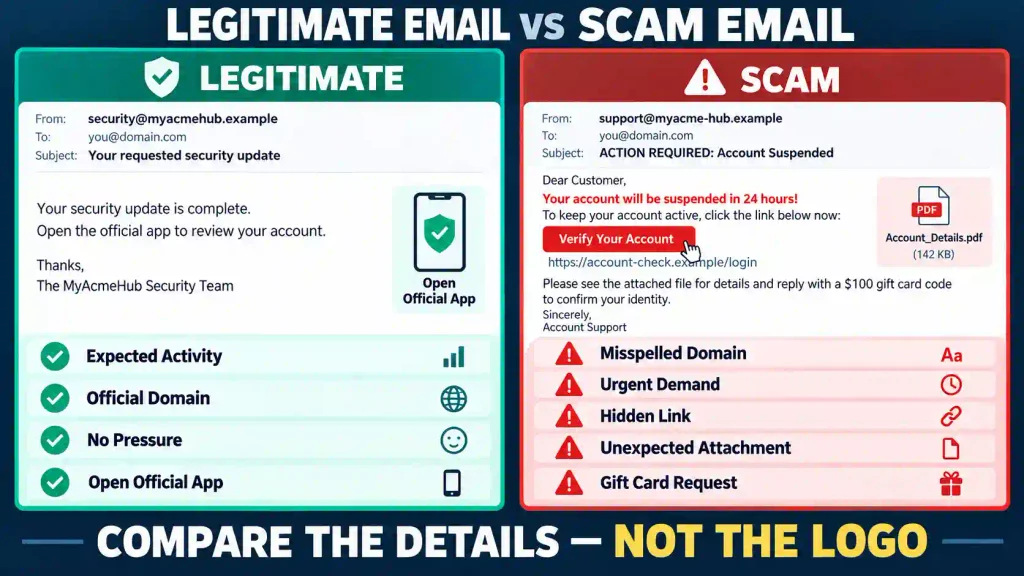
No single characteristic proves that an email is safe. Use the complete pattern.
| Feature | Possible scam email | More trustworthy email |
|---|---|---|
| Sender | Misspelled, unrelated or free email address | Expected official domain |
| Timing | Unexpected and unrelated to your activity | Matches an action you recently took |
| Tone | Fear, pressure, secrecy or extreme excitement | Clear and measured |
| Request | Password, code, money or sensitive information | Directs you to your official account |
| Link | Hidden, shortened or unrelated domain | Matches the verified organization |
| Attachment | Unexpected or poorly explained | Expected and independently confirmed |
| Payment | Gift card, cryptocurrency or wire transfer | Established payment process |
| Verification | Discourages questions | Allows independent confirmation |
| Account warning | Exists only in the email | Also appears in your real account |
| Contact details | Supplied only inside the message | Match previously verified records |
A well-designed email can still be fraudulent. An ordinary-looking message can still be genuine. Verification matters more than appearance.
Why Perfect Grammar Does Not Prove an Email Is Safe
The old advice was simple: look for poor spelling and grammar.
That advice is no longer enough.
Scammers can use writing tools to create polished messages. They can copy genuine emails almost word for word. They can also study a person’s public posts and imitate their tone.
Spelling and formatting errors remain useful clues, but their absence proves nothing.
Look instead for inconsistencies between:
- The sender and the domain
- The request and your recent activity
- The claimed problem and your real account
- The payment process and the organization’s normal procedure
- The sender’s identity and the available independent evidence
Can an Email Be Fraudulent Even When the Address Looks Correct?
Yes.
A correct-looking address can appear in a scam for several reasons:
The account may be compromised
A criminal who gains access to a genuine mailbox can send messages from the real account.
This is particularly dangerous because the scammer may read previous conversations and imitate the sender’s tone.
The visible sender information may be misleading
Email systems can sometimes display sender information that appears more trustworthy than it really is.
The organization’s system may have been abused
A message can pass through a legitimate mailing platform while still containing fraudulent content.
The conversation may have been hijacked
A criminal with access to an email account may enter an existing conversation about a real invoice or project and provide fraudulent payment details.
Therefore, a matching address is one clue—not final proof.
How to Check a Suspicious Email Without Putting Yourself at Risk
You can investigate most questionable messages without clicking or replying.
Inspect the sender details
Expand the header information and review:
- The complete From address
- The Reply-To address
- The domain spelling
- The recipient list
- Any unexpected mailing address
Search for the claim independently
If the message describes a known scam pattern, search for a distinctive sentence from the email.
Do not assume the message is safe simply because you cannot find complaints. New campaigns may not have been reported yet.
Check your real account
Open the official app or type the known website address into your browser.
Look for:
- Security alerts
- Recent orders
- Messages
- Subscription details
- Payment history
- Account restrictions
- Delivery information
Contact the alleged sender another way
Call a number you already trust or use a separate communication channel.
For work requests, use your company directory, internal messaging system or established approval process.
Ask someone else to review it
A second person may notice pressure or inconsistencies that you missed.
Do not forward dangerous attachments. Use a screenshot that does not expose sensitive information.
What Not to Do With a Suspicious Email
If you believe an email may be fraudulent:
- Do not reply.
- Do not click its links.
- Do not open unexpected attachments.
- Do not scan its QR code.
- Do not call telephone numbers inside it.
- Do not send identity documents.
- Do not share security codes.
- Do not approve unexpected login requests.
- Do not allow remote access to your device.
- Do not send a test payment.
- Do not continue the conversation to confront the scammer.
Report the message through your email provider and delete it after preserving any evidence you may need.
What to Do If You Opened the Email but Did Not Click Anything
Simply opening an email is usually less dangerous than clicking a link, opening an attachment or entering information.
Still, take sensible precautions:
- Do not interact with any content.
- Close the message.
- Mark it as phishing or spam.
- Delete it.
- Keep your device and email software updated.
- Watch for follow-up messages using the same story.
If the message automatically downloaded a file or your device began behaving strangely, follow the attachment-response steps below.
What to Do If You Clicked a Suspicious Link
Clicking does not automatically mean your accounts have been stolen. Your next actions depend on what happened after the click.
Take these steps:
- Close the page.
- Do not enter any information.
- Do not download or install anything.
- Check your downloads folder for unfamiliar files.
- Run an updated security scan.
- Update your browser and operating system.
- Monitor your important accounts.
- Report the fraudulent page.
If you entered a password, payment information or personal details, take the additional steps below.
What to Do If You Entered Your Password
Assume the password has been exposed.
Act immediately:
- Open the real website or application.
- Change the compromised password.
- Change it anywhere else you reused it.
- Sign out of other active sessions.
- Enable multifactor authentication.
- Review recent login activity.
- Remove unfamiliar connected applications.
- Check recovery email addresses and telephone numbers.
- Review email forwarding rules.
- Contact the provider if you lose access.
Secure your email account first because criminals can use it to reset passwords for many other services.
What to Do If You Shared a Verification Code
A verification code may give a criminal immediate access to your account.
Take these steps:
- Change the account password.
- End all active sessions.
- Remove unfamiliar devices.
- Review account recovery information.
- Contact the service’s fraud or security department.
- Check for unauthorized transactions or changes.
Do not approve additional login prompts. Repeated prompts may be an attempt to wear down your resistance.
What to Do If You Downloaded an Attachment
If you downloaded but did not open the file, delete it and empty the appropriate deleted-files location.
If you opened it or something installed:
- Disconnect the device from the internet if it is behaving unusually.
- Do not enter passwords or access financial accounts from that device.
- Run a full scan with updated security software.
- Remove unfamiliar programs or browser extensions.
- Contact your workplace security team if it is a business device.
- Seek qualified technical help if you cannot confirm the device is safe.
- Change important passwords from a different, trusted device.
Do not copy suspicious files onto other devices.
What to Do If You Sent Money or Banking Information
Contact your bank, card issuer or payment provider immediately using a trusted telephone number.
Tell the fraud department:
- What happened
- When it happened
- How much was sent
- Which payment method was used
- Who received the payment
- What information you disclosed
Ask whether the payment can be stopped, recalled, reversed or disputed.
If card information was exposed, request that the card be blocked and replaced.
If banking credentials were disclosed:
- Change the password.
- Review recent transactions.
- Remove unknown payment recipients.
- Enable transaction alerts.
- Check for changes to contact details.
- Continue monitoring the account.
Victims are frequently targeted again by criminals pretending to be investigators or recovery specialists. Review these scam warning signs before paying anyone who claims to have recovered your money.
What to Do If You Shared Personal Information
The response depends on what you shared.
If you disclosed identity or financial information:
- Preserve copies of the email and conversation.
- Report the incident to the relevant organization.
- Monitor bank and credit accounts.
- Change exposed passwords.
- Consider a fraud alert or credit freeze where available.
- Watch for unfamiliar accounts, applications or password resets.
- Report identity theft through the appropriate authority in your country.
Scammers may wait before using stolen information. Continue monitoring even if nothing happens immediately.
How to Report a Scam Email
Reporting a scam email may help block the sender and protect other people.
You can:
- Use “Report phishing” in your email service.
- Notify the company being impersonated through its official website.
- Contact your employer’s security team if the message reached a work account.
- Report financial fraud to your bank or payment provider.
- Report the incident to the national fraud or cybercrime authority where you live.
- Preserve receipts, screenshots, email headers and transaction records if money was lost.
Do not continue communicating with the scammer merely to collect more evidence.
How to Protect Yourself From Future Scam Emails
No filter can stop every fraudulent message. Build habits that reduce the damage a scammer can cause.
Use a unique password for every important account
If one password is stolen, criminals will often test it on other services.
A password manager can create and store unique passwords.
Enable multifactor authentication
Use multifactor authentication on email, banking, social-media and shopping accounts.
Never approve a login you did not initiate.
Use official apps, bookmarks and saved contacts
Instead of following email links, open trusted applications or bookmarks.
Store verified telephone numbers for banks, employers, relatives and important service providers.
Keep software updated
Install updates for your operating system, browser, email application and security software.
Updates often fix weaknesses that attackers could exploit.
Limit public personal information
Public details about your employer, relatives, location and recent activities can help scammers personalize messages.
Review the information visible on your social-media profiles.
Create a verification rule for money and sensitive information
Make this your rule:
No payment, password, security code or identity document will be provided until the request has been independently verified.
That one habit can stop many scams.
Frequently Asked Questions
These concise answers address the questions people commonly ask after receiving a suspicious message.
1. How can I tell if an email is from a scammer?
Reveal the sender’s complete address, inspect the domain, preview links without opening them and verify the claim through an official app, website or trusted telephone number.
2. What is the biggest red flag in a scam email?
An unexpected request for money, passwords, verification codes or sensitive information combined with urgency is one of the strongest warning signs.
3. Can a scammer use my real name?
Yes. Your name may come from social media, public records, marketing databases, previous data breaches or compromised contacts.
4. Can a scam email come from a real address?
Yes. A legitimate account may be compromised. Verify unusual requests through a different communication channel.
5. Does perfect spelling mean an email is genuine?
No. Scammers can produce polished, grammatically correct messages. Good writing is not proof of legitimacy.
6. Can scammers copy a company’s logo?
Yes. Logos, colors, signatures, disclaimers and complete email designs can be copied.
7. Is an email safe if it uses HTTPS links?
Not necessarily. Fraudulent websites can also use HTTPS. Encryption does not prove who owns the website.
8. Should I reply and ask whether the email is genuine?
No. Contact the supposed sender through a trusted channel instead. Replying keeps you inside the potentially fraudulent conversation.
9. Is it safe to click “unsubscribe” in a suspicious email?
Not always. A fraudulent unsubscribe link may confirm that your address is active or lead to a dangerous website. Report clearly suspicious messages as spam.
10. What is the difference between spam and a scam email?
Spam is unwanted bulk communication and may only advertise something. A scam email is intended to steal money, information or account access.
11. What is the difference between phishing and email fraud?
Phishing usually tries to steal credentials or information through impersonation. Email fraud is broader and includes fake invoices, jobs, prizes, investments and payment requests.
12. Can opening an email infect my device?
Simply viewing a message is generally less risky than opening an attachment or clicking a link. Keep your software updated and avoid interacting with suspicious content.
13. What happens if I click a scam email link?
You may reach a fake login page, trigger a download or reveal that your address is active. Close the page and respond according to what you did afterward.
14. What should I do if I entered my password?
Change it immediately on the real website, update reused passwords, end active sessions and enable multifactor authentication.
15. What should I do if I provided a security code?
Secure the account immediately, remove unknown devices and contact the service provider. The scammer may already be trying to enter the account.
16. How do I check where a link leads?
Hover over it on a computer or carefully preview it on a phone. Do not trust the words displayed on the button.
17. Are shortened links always scams?
No, but they hide the final destination. Avoid them in unexpected messages involving payments, logins or personal information.
18. Are unexpected invoices always fraudulent?
No. A genuine billing error is possible. Check the charge through your official account and contact the company using trusted information.
19. Why do scammers request gift cards?
Gift cards are fast, transferable and difficult to reverse. Legitimate organizations do not use them to settle debts or secure accounts.
20. Can a scammer reply from a real person’s account?
Yes. A compromised mailbox may allow the criminal to read previous messages and respond convincingly.
21. Should I trust an email because it passed the spam filter?
No. Filters cannot detect every scam. You must still verify unexpected or sensitive requests.
22. How can I check an email from my employer?
Contact the sender through your company directory or internal messaging system and follow established approval procedures.
23. Can a QR code in an email be dangerous?
Yes. It can lead to a fraudulent website just like a malicious link. Use the organization’s official application or website instead.
24. Where should I report a scam email?
Report it through your email provider, the impersonated organization and the relevant fraud or cybercrime authority. Contact your bank immediately if financial information was involved.
25. What is the safest rule for suspicious emails?
Never use the message itself to verify the message. Confirm the claim through a trusted channel obtained independently.
Final Scam Email Checklist
Before trusting an unexpected email, ask:
- Was I expecting this message?
- Does the complete sender address match the organization?
- Is the domain spelled correctly?
- Does the Reply-To address make sense?
- Is the sender creating panic, excitement or secrecy?
- Does the message request money or sensitive information?
- Is there an unexpected attachment?
- Do the links lead to the correct official domain?
- Does the claimed problem appear in my real account?
- Can I verify the sender through another channel?
- Does the request follow the organization’s normal procedure?
- Can the request survive a reasonable delay for verification?
If you cannot answer these questions confidently, do not interact with the message.
Professional design can be copied. A familiar name can be faked. A real account can be compromised. Perfect grammar can be generated in seconds.
Independent verification—not appearance—is the strongest way to tell if an email is from a scammer.
Pingback: How to Spot Social Security Scams Before Your Benefits, Savings or Identity Are Stolen: 17 Red Flags You Should Never Ignore - SafeGuard Press
Pingback: Credit Card Fraud: 15 Warning Signs and What to Do Immediately - SafeGuard Press
Pingback: Real Estate Scams: How to Spot Fake Listings, Closing Fraud, and Property Theft - SafeGuard Press
Pingback: Closing Wire Fraud: How to Verify Real Estate Payment Instructions Before You Send Money - SafeGuard Press
Pingback: How to Protect Your Child From Identity Theft Before the Damage Starts - SafeGuard Press
Pingback: Identity Theft in 2026: 17 Warning Signs and How to Protect Yourself - SafeGuard Press
Pingback: AI Scams in 2026: 17 Dangerous Types and How to Protect Yourself - SafeGuard Press
Pingback: Does eBay Refund Scams? What Buyers Should Do After a Suspicious Purchase - SafeGuard Press
Pingback: Compromised Credit Card Meaning: Is Your Money at Risk? What to Do Now - SafeGuard Press
Pingback: How to Not Get Scammed on Vinted as a Seller: Before You Ship - SafeGuard Press
Pingback: Vinted Buyer Says Item Not as Described: What to Do - SafeGuard Press
Pingback: Is It Safe to Give Card Details for a Refund? What to Share and What to Refuse - SafeGuard Press
Pingback: Vinted Buyer Returned a Different Item? What to Do - SafeGuard Press