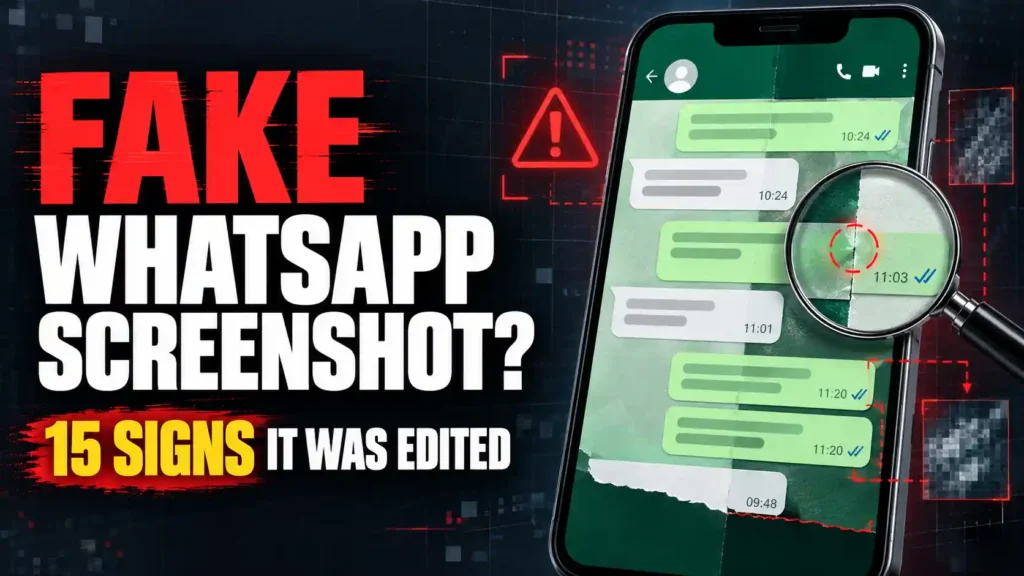
A fake WhatsApp screenshot can destroy trust, trigger a fraudulent payment or make an innocent person appear guilty.
Names, profile photographs, messages, timestamps and check marks can all be fabricated without accessing the alleged participant’s account. A scammer can create a believable conversation within minutes and present it as payment proof, a customer testimonial, a romantic confession, a business instruction or evidence of wrongdoing.
That is why a professional-looking screenshot proves very little by itself.
A fake WhatsApp screenshot may contain inconsistent fonts, message bubbles, timestamps, check marks, quoted replies or image quality. However, a flawless screenshot can still be fabricated. Before you trust, pay, accuse or share anything, examine the complete conversation and verify its claims through a separate channel.
This guide explains 15 warning signs, a five-minute verification test and the steps to take when the screenshot involves money, blackmail, employment or your reputation.
How to Identify a Fake WhatsApp Screenshot Quickly
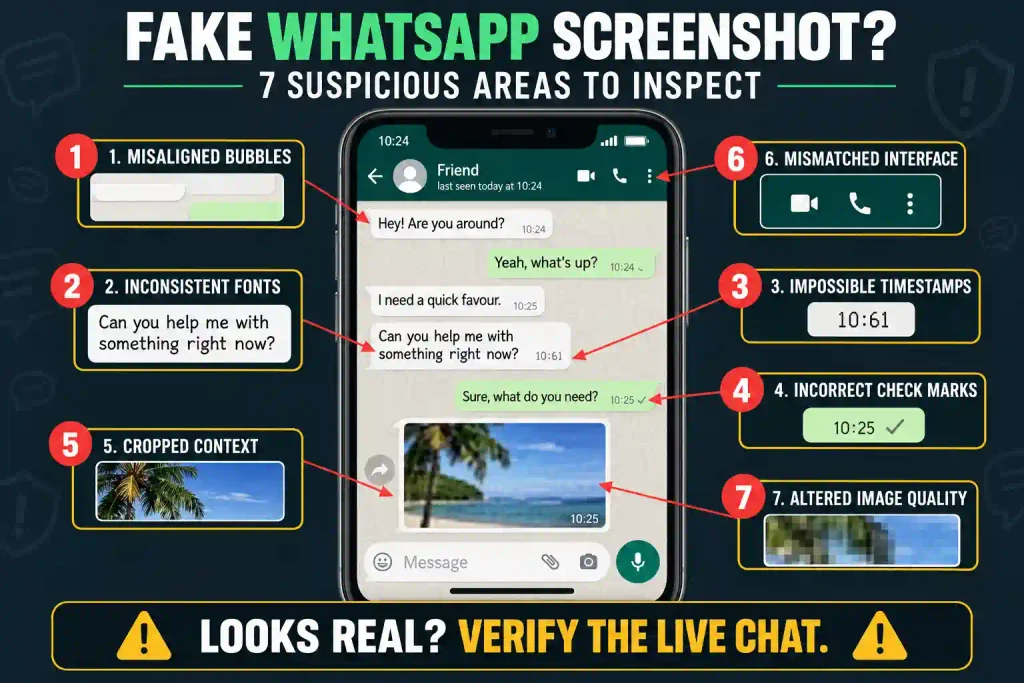
Start by asking these seven questions:
- Can you see the complete conversation?
- Is the actual telephone number visible?
- Can that number be independently verified?
- Do the dates, timestamps and replies follow a logical order?
- Are the fonts, message bubbles and check marks internally consistent?
- Will the person who supplied the image show the live conversation?
- Does evidence outside the screenshot support the claim?
One strange detail does not automatically prove fabrication. WhatsApp looks different across Android phones, iPhones, desktop applications, themes and software versions.
The danger becomes greater when several visual inconsistencies appear alongside missing context, factual contradictions or resistance to verification.
The most important rule is simple:
A screenshot may support a claim, but a screenshot alone rarely proves that the claim is true.
Can Someone Create a Fake WhatsApp Screenshot?
Yes. Someone can create a fake WhatsApp screenshot without hacking your account or accessing your phone.
A person can:
- Save an unrelated number under your name
- Copy your profile photograph from social media
- Control both sides of a staged conversation
- Edit words inside a genuine screenshot
- Replace dates or timestamps
- Add false delivery and read receipts
- Remove messages that change the meaning
- Combine sections from separate conversations
- Recreate the interface in design software
- Use a fake-chat generator
- Stage a video-call screen
- Crop the image to conceal contradictory evidence
Some fake-chat generators allow users to choose the contact name, photograph, message text, time, battery level, delivery marks and who supposedly sent each message. The resulting image can look convincing enough to deceive someone who is frightened, angry or under pressure.
That does not mean every WhatsApp screenshot is fake. Screenshots remain useful for recording conversations. The problem is that appearance cannot establish who controlled the accounts, whether messages were removed or whether the exchange exists on the alleged participants’ devices.
Why Fake WhatsApp Screenshots Are Dangerous
A fabricated conversation can cause damage before anyone checks whether it is real.
Fake screenshots may be used to:
- Produce false payment confirmation
- Create fabricated customer testimonials
- Impersonate company executives
- Manufacture evidence of an affair
- Frame someone for harassment
- Spread false statements on social media
- Manipulate workplace investigations
- Blackmail an innocent person
- Fake business agreements
- Promote fraudulent investments
- Support romance scams
- Damage a competitor’s reputation
The screenshot does not always need to be completely fabricated. A genuine conversation can be cropped or presented without context so that it appears to mean something different.
For example, “Yes, send the payment” may refer to a legitimate invoice. If everything before that sentence is removed, the same message could be presented as approval for an unrelated transfer.
Therefore, you must investigate both authenticity and context.
Fake WhatsApp Screenshot vs Genuine Screenshot
This comparison can help you evaluate the image without jumping to conclusions.
| What to examine | More reassuring | More suspicious |
|---|---|---|
| Conversation context | Messages before and after are available | Only one damaging statement appears |
| Contact identity | The number can be independently confirmed | Only an editable contact name is visible |
| Original device | The conversation can be opened normally | Only a forwarded image is available |
| Timeline | Messages follow a logical order | Dates, times or replies conflict |
| Interface | Fonts, icons and bubbles remain consistent | Important elements suddenly change |
| Image quality | Compression is reasonably uniform | One message is noticeably sharper or blurrier |
| Cooperation | The provider permits reasonable checks | The provider creates urgency or refuses |
| Other participant | The same exchange appears on their device | They deny it and no original is available |
| Payment evidence | Funds appear in your own account | The screenshot is the only proof |
| External facts | Independent records support the claim | Everything depends on one image |
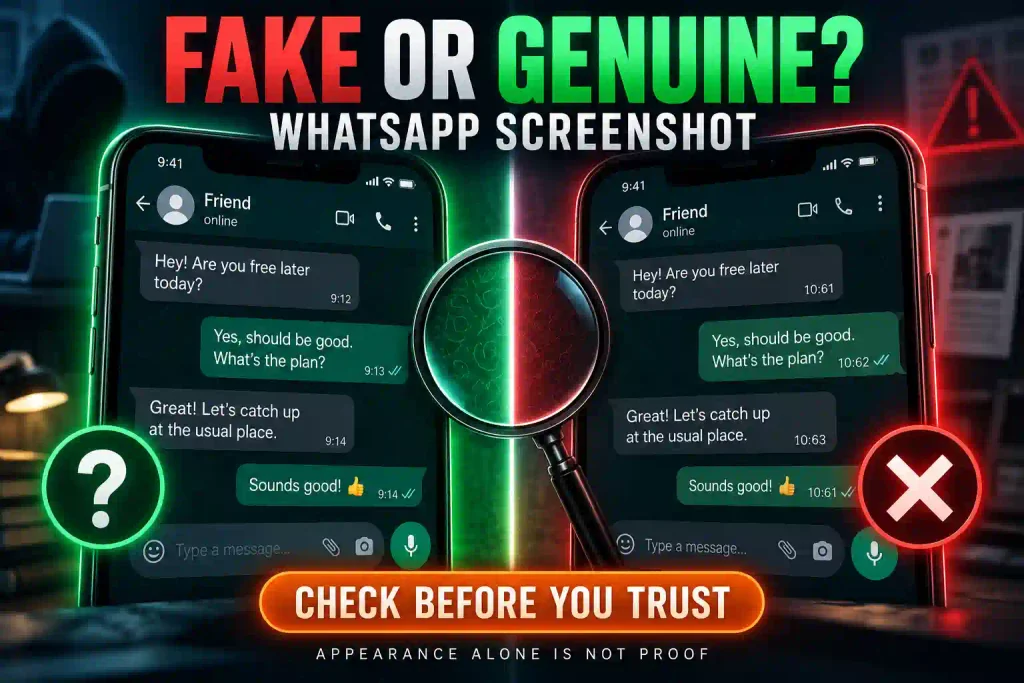
No single reassuring detail certifies authenticity. Instead, credibility increases when multiple independent forms of evidence agree.
15 Signs of a Fake WhatsApp Screenshot
These warning signs can expose careless editing or fabrication. Use them to decide whether further verification is needed—not to make an immediate accusation.
1. The Message Bubbles Are Misaligned
WhatsApp normally applies consistent spacing and alignment to messages displayed on the same device.
Examine whether:
- Incoming messages have different left margins
- Outgoing messages have inconsistent right margins
- Message tails point in the wrong direction
- Text sits too close to one edge
- Bubble corners change without explanation
- Adjacent bubbles use different spacing
- One message appears wider or narrower than expected
Replies, voice notes, images and different message lengths can create legitimate variations. Compare similar message types within the same screenshot instead of expecting every bubble to have an identical shape.
An alignment problem becomes more suspicious when it affects only the message that supposedly proves the allegation.
2. The Font Changes Around Important Messages
Editing software and fake-chat generators may fail to reproduce the exact font, weight, size or line spacing used by the original interface.
Zoom in and compare several messages. Look for:
- A different typeface
- Heavier or thinner letters
- Unusual character spacing
- Inconsistent line height
- Text that is not vertically centered
- One sentence appearing unusually sharp
- A name or timestamp using the wrong weight
Accessibility settings, display scaling, language preferences and image compression can change how text appears. Consequently, a small font difference is not conclusive.
The stronger warning is a sudden change confined to the disputed message while everything surrounding it remains consistent.
3. The Timestamps Do Not Make Sense
Read every visible timestamp from top to bottom.
Ask:
- Do the times move forward normally?
- Does a response appear before the question?
- Does a quoted reply predate the original message?
- Do two long messages appear impossibly close together?
- Does the date separator match the messages below it?
- Does the stated time zone fit the situation?
- Does a payment confirmation appear before payment was requested?
People travel, type quickly and sometimes send messages after losing connectivity. Those possibilities should be considered.
However, an impossible chronology is more serious than a minor difference in color or spacing.
4. Check Marks Are Incorrect or Inconsistent
WhatsApp check marks can indicate that a message was sent, delivered or read. Their appearance may vary depending on connectivity, privacy settings, application version and chat type.
A suspicious screenshot may contain:
- Marks on received messages
- Check marks pointing in the wrong direction
- Different mark sizes on adjacent messages
- Incorrect spacing between the time and checks
- Blue marks that conflict with the sequence
- One message using a completely different style
- Marks positioned outside the normal message area
Do not assume that every read message must show blue checks. Read receipts can be disabled, and group conversations can behave differently.
The question is whether the check marks are consistent with the rest of that particular screenshot.
5. The Header Combines Elements From Different Devices
The top of the image may reveal that interface elements were copied from different sources.
Inspect:
- Back button
- Contact photograph
- Contact name
- Voice-call icon
- Video-call icon
- Menu symbol
- Battery indicator
- Wi-Fi and mobile-network icons
- Clock position
- Camera cutout or notch
- Spacing around the header
A supposed iPhone screenshot containing Android interface elements requires investigation. The same applies to an image combining an old WhatsApp header with newer message features.
Nevertheless, WhatsApp Web, desktop software, operating-system updates and different Android manufacturers create legitimate variations. Compare the image with the correct device and approximate application version.
6. The Contact Name Is Being Used as Identity Proof
A displayed contact name does not prove who owns the number.
Anyone can save a telephone number under names such as:
- Mum
- Bank Manager
- Company Director
- Customer Support
- Sarah Office
- My Husband
Profile photographs can also be copied from social media or company websites.
Ask to see the telephone number behind the saved name. Then compare it with contact information you trusted before the screenshot appeared.
If the person behind the messages is requesting money, confidential information or account access, use the verification process in how to identify a scammer on WhatsApp before responding.
7. The Screenshot Is Conveniently Cropped
People sometimes crop screenshots for legitimate privacy reasons. However, strategic cropping can hide the information needed to understand a conversation.
The missing section may contain:
- The actual telephone number
- The conversation date
- Earlier disagreement
- Later correction
- Evidence that the exchange was a joke
- A message revealing impersonation
- The real participant’s name
- Signs that the image came from a generator
- Details contradicting the accusation
Ask for a wider view showing the messages immediately before and after the disputed section.
If unrelated information must remain private, it can be covered in a separate copy while the untouched original is preserved.
8. Image Quality Changes Around One Message
A message added to an existing screenshot may not share the same compression, sharpness or pixel pattern as its surroundings.
Zoom in and look for:
- A rectangular area with different image noise
- Jagged edges around selected letters
- Unusual blurring behind one bubble
- A change in background color
- Repeated textures
- One timestamp appearing unusually clean
- Hard borders around a pasted icon
- Different sharpness within the same line
Forwarding, compressing and resaving an image can produce innocent artifacts. Social networks may also lower image quality.
A general loss of quality proves nothing. A sudden change concentrated around the most important message deserves closer examination.
9. Colors Change Without Explanation
A WhatsApp fake screenshot may use colors that look nearly correct but do not remain consistent throughout the image.
Compare equivalent elements:
- Incoming message bubbles
- Outgoing message bubbles
- Timestamps
- Read receipts
- Date separators
- System notices
- Link previews
- Background areas
Do not compare an Android dark-mode screenshot with an iPhone light-mode screen. Themes, devices and application versions can produce legitimate differences.
An unexplained inconsistency inside the same screenshot is more meaningful than a difference between two separate phones.
10. Quoted Replies Do Not Match the Original Messages
WhatsApp allows a person to reply to a particular message. The reply usually includes a shortened version of the quoted content.
Investigate when:
- The quoted message never appears
- The quotation changes important wording
- The reply appears before the original message
- The wrong participant is identified
- The quoted area uses a different design
- The reply refers to missing information
- The quoted time conflicts with the conversation
The original message may sit outside the captured area or may have been deleted. Ask for the complete sequence before reaching a conclusion.
Pay close attention to omitted words. Removing “not” from “Do not send the payment” completely reverses the meaning.
11. Voice Notes or Media Elements Look Wrong
Fabricators may add voice notes, documents, photographs or location cards to make a conversation appear more convincing.
Examine:
- Play-button design
- Audio waveform
- Voice-note duration
- Microphone icon
- Profile photograph
- Media corners
- File name
- File format
- File size
- Download indicator
- Caption alignment
A correct-looking waveform proves only that the screenshot contains an image of a voice note. It does not prove that the audio exists or identify who recorded it.
Ask to play the voice note from the live conversation. Even then, remember that audio can be copied, edited or artificially generated.
12. The Messages Do Not Sound Like the Claimed Person
A visually perfect conversation may still contain language that does not fit the supposed participant.
Compare the messages with the person’s established communication style:
- Are familiar greetings missing?
- Does the person use an unusual nickname?
- Is the punctuation noticeably different?
- Are unfamiliar expressions appearing?
- Is the language unexpectedly formal?
- Does the message sound scripted?
- Is the request completely out of character?
Writing style is not absolute proof. People change their tone depending on their audience, stress level and circumstances. Artificial intelligence can also imitate a writing pattern when given enough examples.
Use behavioral inconsistencies to trigger verification rather than to declare the screenshot fake.
13. The Screenshot Conflicts With External Evidence
The most important evidence may exist outside the image.
Suppose a fake WhatsApp screenshot claims that a supplier changed its payment details. Verify whether:
- The supplier confirms the change through a known number
- The account belongs to the business
- The invoice displays the same information
- Another authorized employee approved it
- The normal payment procedure was followed
- The sender had access to the account at that time
- The business has issued an official notice
Similarly, a screenshot showing a completed payment does not prove that money entered your account.
Open your own financial application and confirm the transaction independently. Do not trust an image, email or SMS notification supplied by the buyer.
14. The Provider Refuses to Show the Live Chat
Ask the person who supplied the screenshot to open WhatsApp and navigate to the conversation.
When appropriate, request that the person:
- Open WhatsApp from the normal home screen.
- Find the chat in the conversation list.
- Scroll through earlier and later messages.
- Open the contact-information page.
- Show the associated telephone number.
- Search for a distinctive phrase.
- Open relevant media or message information.
A recorded screen video provides more context than a still image, but it can be edited or staged. Live screen sharing is stronger, yet contact names can still be changed and staged conversations can exist on controlled devices.
Credibility becomes much stronger when the exchange appears consistently on both alleged participants’ devices and agrees with independent evidence.
15. The Sender Creates Urgency to Stop Verification
The strongest warning may come from the person presenting the screenshot.
Be cautious when someone says:
- “You must decide now.”
- “Do not contact the other person.”
- “Share this before it gets deleted.”
- “Pay immediately.”
- “There is no time to investigate.”
- “If you ask questions, I will withdraw the evidence.”
- “Delete this after reading it.”
Urgency pushes people toward emotional decisions. It can make an ordinary image seem more trustworthy than it is.
Someone presenting serious evidence should expect reasonable verification. Refusing every independent check weakens the claim.
The Five-Minute Fake WhatsApp Screenshot Test
Do not spend hours examining individual pixels while ignoring the story behind the image. Use this five-minute process to reach a safer preliminary conclusion.
Minute 1: Define What the Screenshot Supposedly Proves
Reduce the claim to one factual sentence.
For example:
“This screenshot supposedly proves that my supplier changed the bank account for today’s payment.”
Or:
“This screenshot supposedly proves that my employee shared confidential information.”
This separates the actual claim from the fear, anger or excitement surrounding it.
Minute 2: Examine the Screenshot
Check:
- Contact name and number
- Dates and timestamps
- Message order
- Bubble alignment
- Fonts and spacing
- Check marks
- Quoted replies
- Header and status bar
- Cropping
- Image-quality changes
Record anything unusual. Do not edit or overwrite the original file.
Minute 3: Request the Missing Context
Ask for:
- The uncropped screenshot
- Earlier and later messages
- The original image file
- The live conversation
- Contact information
- Relevant message details
- Associated audio, video or documents
A person may reasonably protect unrelated private information. Nevertheless, enough context should be available to support a serious allegation.
Minute 4: Verify Through a Trusted Channel
Contact the alleged participant using information you already trusted before receiving the screenshot.
Do not call a number shown only inside the suspicious image. Do not use a verification link provided by the person presenting it.
For a business claim, use an official website, established email address or previously saved number. For payment, inspect your own account.
Minute 5: Classify the Evidence
Place the image in one of four categories:
- Consistent but not independently verified
- Suspicious and requiring more evidence
- Contradicted by independent information
- Serious enough for professional examination
Do not force a “real” or “fake” conclusion when the evidence supports only uncertainty.
How to Detect a Fake WhatsApp Video Call Screenshot
A fake WhatsApp video call screenshot may be staged, edited, generated or taken from an unrelated call.
Examine:
- Position of call controls
- Design of microphone and camera icons
- Participant-window dimensions
- Call duration
- Status-bar information
- Camera orientation
- Lighting consistency
- Resolution differences
- Unnatural borders around the participant
- Reflections that conflict with the scene
- Interface elements from different devices
- Faces or backgrounds reused from older images
A genuine video-call image can also be misrepresented. Someone may present an old screenshot as proof that a recent call occurred.
The image does not prove what was discussed, whether the participant approved anything or whether the call happened on the claimed date.
If a face, participant window or background appears artificially generated, compare it with how to spot a deepfake image before trusting it.
Can Metadata Prove a WhatsApp Screenshot Is Real?
Metadata may provide useful clues, but it cannot establish authenticity by itself.
An original image file may contain:
- File dimensions
- File format
- Creation date
- Modification date
- Device details
- Software information
- Color profile
- Evidence that the file was resaved
However:
- Metadata can be changed or removed.
- Messaging applications may strip information.
- Resaving can replace dates.
- A genuine screenshot can display a staged chat.
- A manipulated file can contain ordinary-looking metadata.
- Missing editing-software information proves nothing.
Do not upload private evidence to an unknown fake-screenshot detector. The image may contain telephone numbers, intimate conversations, financial information or confidential workplace details.
Preserve the original file and obtain appropriate professional assistance when the consequences are serious.
Can an Exported WhatsApp Chat Prove Authenticity?
An exported chat can provide context, but it is not unquestionable proof.
A text export may reveal a longer sequence of messages and timestamps. However, the exported file can be edited after creation, and it may not preserve all interface details.
Use an export as supporting evidence by:
- Preserving the original export
- Comparing it with the live conversation
- Checking whether both participants’ records agree
- Preserving accompanying media
- Recording when and how the export was created
For legal or workplace investigations, do not rewrite, reorganize or “clean up” the evidence.
What to Do With a Fake WhatsApp Payment Screenshot
Fake payment confirmation is one of the most dangerous uses of fabricated screenshots.
A buyer may claim that:
- The payment is processing
- Your bank is experiencing a delay
- The transfer requires a refund
- They accidentally overpaid
- You must pay a release fee
- An email proves the transaction
- The money will appear after you release the goods
Ignore the image and check the transaction yourself.
Take these steps:
- Open your own banking or payment application.
- Check the available balance and transaction history.
- Confirm that the transaction is completed, not pending.
- Verify the amount, sender and reference.
- Determine whether the payment can be reversed.
- Contact the institution through an official channel if uncertain.
- Do not release goods or provide services until payment is confirmed.
Never refund a supposed overpayment until your institution confirms that genuine, settled funds were received.
A payment screenshot is evidence of a claim—not evidence that you were paid.
What to Do if a Fake Screenshot Is Used for Blackmail
A fabricated conversation may be used to threaten your reputation, employment, marriage or personal safety.
Do not immediately pay, argue or distribute the screenshot while trying to defend yourself.
Instead:
- Preserve the original image.
- Save the message through which it arrived.
- Record the sender’s number and profile.
- Preserve every threat and payment request.
- Save usernames, links and financial instructions.
- Stop providing additional personal information.
- Tell someone you trust.
- Report the account through the platform.
- Document where the image has been published.
- Contact the appropriate authorities when threats or extortion are involved.
- Obtain qualified legal advice when your employment or reputation is threatened.
Paying does not guarantee deletion. It may show the blackmailer that additional demands could work.
Follow a structured plan explaining what to do if a scammer is blackmailing you before taking an irreversible action.
How to Preserve a Suspicious Screenshot Properly
Evidence preservation matters when the screenshot could become part of a police report, employment investigation, insurance claim or legal dispute.
Take these steps:
- Keep the original image exactly as received.
- Do not crop or annotate the only copy.
- Preserve the original message and conversation.
- Record the sender’s number and profile details.
- Note when and how you received it.
- Save related audio, video, links and documents.
- Make a secure backup.
- Limit unnecessary forwarding.
- Keep a record of who handled the file.
- Seek appropriate professional assistance before attempting advanced analysis.
If you need an annotated version, create a duplicate first. Never overwrite your only original.
Common Mistakes When Checking a WhatsApp Fake Screenshot
Avoid these errors:
- Assuming a professional-looking image must be genuine
- Assuming one unfamiliar icon proves fabrication
- Treating a saved contact name as verified identity
- Comparing Android and iPhone layouts carelessly
- Trusting an unknown detection website with private evidence
- Publicly accusing someone before verification
- Asking only the screenshot provider for confirmation
- Treating a screen recording as absolute proof
- Editing or deleting the original file
- Ignoring messages outside the captured area
- Sending money before verification is complete
- Allowing urgency to control your decision
A proper investigation examines the image, the complete story, the people involved and the independent evidence.
Frequently Asked Questions About Fake WhatsApp Screenshots
These answers address the most common questions about identifying, verifying and responding to a suspicious WhatsApp image.
1. What is a fake WhatsApp screenshot?
A fake WhatsApp screenshot is an image that falsely represents a WhatsApp conversation, payment, call or account. It may be completely fabricated, edited from a genuine screenshot or presented without essential context.
2. How can I identify a fake WhatsApp screenshot?
Check the fonts, message bubbles, timestamps, check marks, quoted replies, contact information, image quality and surrounding context. Then verify the conversation through a separate channel.
3. Can someone create a fake WhatsApp conversation?
Yes. Someone can control both sides of a staged exchange, edit a genuine image or use a fake-chat generator.
4. Can a fake WhatsApp screenshot look completely real?
Yes. A carefully produced fake may contain no visible errors. That is why independent verification is more reliable than appearance.
5. What is the clearest sign that a WhatsApp screenshot is fake?
There is no universal visual sign. A combination of missing context, unverifiable identity, factual contradictions and refusal to show the live conversation is more persuasive.
6. Is there an application that detects fake WhatsApp screenshots?
Some tools claim to detect manipulation, but no ordinary detector is infallible. Uploading private conversations may also expose sensitive information.
7. Can metadata show whether a screenshot was edited?
Metadata may provide clues, but it can be removed, changed or replaced. It cannot authenticate an image by itself.
8. Does a displayed contact name prove who sent the messages?
No. A person can save any number under any name. The number must be checked independently.
9. Do blue check marks prove the screenshot is genuine?
No. Check marks can be recreated inside a fabricated image.
10. Can a fake WhatsApp screenshot show payment confirmation?
Yes. Fake payment screenshots are frequently used to obtain goods, services or fraudulent refunds. Confirm payment in your own account.
11. Why do people create fake WhatsApp screenshots?
Possible reasons include fraud, false testimonials, harassment, revenge, blackmail, relationship manipulation, fabricated payment proof and reputational attacks.
12. Can a genuine screenshot still be misleading?
Yes. A real conversation can be cropped, stripped of context or paired with a false explanation.
13. Should I ask for the original screenshot file?
Yes. An original file is more useful than a compressed or repeatedly forwarded copy, although it still does not prove that the conversation is genuine.
14. Can a WhatsApp chat export prove that messages are real?
Not by itself. An exported text file can be edited. Compare it with the live conversation and other evidence.
15. Can a screen recording prove the conversation happened?
A screen recording provides more context than a still image, but it can be staged or edited. Treat it as supporting evidence.
16. Can WhatsApp Web look different from the phone application?
Yes. WhatsApp Web, desktop, Android and iPhone versions can use different layouts, icons and spacing.
17. Are different fonts proof of editing?
No. Accessibility settings, display scaling, compression and software versions can affect fonts. Look for multiple inconsistencies.
18. Can deleted messages make a genuine screenshot look suspicious?
Yes. Deleted messages or missing context can create unexplained gaps. Request the wider conversation.
19. How can I verify the person behind a screenshot?
Contact the alleged participant using previously trusted information. Do not rely exclusively on details shown in the image.
20. Can someone create a fake WhatsApp video call screenshot?
Yes. A person can stage a call, reuse an older image, edit participant windows or recreate the call interface.
21. Should I confront someone suspected of creating the screenshot?
Preserve and verify the evidence first. Immediate confrontation may lead to deletion, retaliation or further manipulation.
22. Can a digital-forensics specialist verify a WhatsApp screenshot?
A specialist may examine the file, original devices, account information and surrounding evidence. A conclusive result depends on what material remains available.
23. What if the screenshot provider refuses to show the live chat?
Privacy may justify hiding unrelated messages, but refusing every reasonable verification request weakens the screenshot’s credibility.
24. Should I share a suspicious screenshot publicly?
Usually not. Public sharing may expose private information, spread a false accusation or interfere with an investigation.
25. What is the safest way to verify a WhatsApp screenshot?
Inspect the image, obtain the complete context, examine the live conversation when appropriate, verify the participants independently and compare the claim with external records.
Final Thoughts: Do Not Let a Screenshot Make the Decision
A fake WhatsApp screenshot works because it looks familiar.
The contact name creates trust. The profile photograph suggests identity. The timestamps imply precision. The check marks make the conversation appear technically legitimate.
But every one of those elements can be copied, edited or recreated.
Visible mistakes may expose a careless fake. The absence of mistakes cannot prove that the screenshot is genuine.
Before making an important decision, ask:
- Can I see the complete conversation?
- Can I verify the telephone number?
- Does the live chat exist?
- Do the dates and replies make sense?
- Does the alleged participant confirm the exchange?
- Do independent records support the claim?
- Is someone pressuring me to act before checking?
When money, employment, relationships, safety or reputation are involved, slow everything down. Preserve the original evidence, verify the claim through a trusted channel and refuse to let one image control your decision.
Trust the evidence that survives verification—not the fake WhatsApp screenshot that merely looks convincing.
Pingback: WhatsApp Scammer List: Check a Suspicious Number, Profile or Message - SafeGuard Press
Pingback: Telegram Scammer List: Check a Suspicious Username, Group or Channel Before You Pay - SafeGuard Press